Extensions
The Rossum platform may be extended via third-party, externally running services or custom serverless functions. These extensions are registered to receive callbacks from the Rossum platform on various occasions and allow to modify the platform behavior. Currently we support these callback extensions: Webhooks, Serverless Functions, and Connectors.
Webhooks and connectors require a third-party service accessible through an HTTP endpoint. This may incur additional operational and implementation costs. User-defined serverless functions, on the contrary, are executed within Rossum platform and no additional setup is necessary. They share the interface (input and output data format, error handling) with webhooks.
See the Building Your Own Extension set of guides in Rossum's developer portal for an introduction to Rossum extensions.
Webhook Extension
The webhook component is the most flexible extension. It covers all the most frequent use cases:
- displaying messages to users in validation screen,
- applying custom business rules to check, change, or autofill missing values,
- reacting to document status change in your workflow,
- sending reviewed data to an external systems.
Webhooks are more recent and flexible alternative to connectors. For new implementations, consider using webhooks.
Implement a webhook
Webhooks are designed to be implemented using a push-model using common HTTPS protocol. When an event is triggered, the webhook endpoint is called with a relevant request payload. The webhook must be deployed with a public IP address so that the Rossum platform can call its endpoints; for testing, a middleware like ngrok or serveo may come useful.
The Extension Howto on our Developer Hub is a good starting point when building your own extension. You can also find a high-level description of hooks in our here or investigate other examples of webhook implementations:
-
Simple custom check example (JavaScript)
-
Vendor matching example (Python)
-
Schema change example (Python)
Webhook vs. Connector
Webhook extensions are similar to connectors, but they are more flexible and easier to use. A webhook is notified when a defined type of webhook event occurs for a related queue.
Advantages of webhooks over connectors:
- There may be multiple webhooks defined for a single queue
- No hard-coded endpoint names (
/validate,/save) - Robust retry mechanism in case of webhook failure
- If webhooks are connected via the
run_afterparameter, the results from the predecessor webhook are passed to its successor
Webhooks are defined using a hook object of type webhook. For a description
how to create and manage hooks, see the Hook API.
Webhook Events
Webhook events specify when the hook should be notified. They can be defined as following:
- either as whole event containing all supported actions for its type (for example
annotation_status) - or as separately named actions for specified event (for example
annotation_status.changed)
Example webhook request payload for annotation_status.changed event:
{
  "request_id": "ae7bc8dd-73bd-489b-a3d2-f5514b209591",
  "timestamp": "2020-01-01T00:00:00.000000Z",
  "base_url": "https://example.rossum.app",
  "rossum_authorization_token": "1024873d424a007d8eebff7b3684d283abdf7d0d",
  "hook": "https://example.rossum.app/api/v1/hooks/789",
  "settings": {
    "example_target_service_type": "SFTP",
    "example_target_hostname": "sftp.elis.rossum.ai"
  },
  "secrets": {
    "username": "my-rossum-importer",
    "password": "secret-importer-user-password"
  },
  "action": "changed",
  "event": "annotation_status",
  "annotation": {
    "document": "https://example.rossum.app/api/v1/documents/314621",
    "id": 314521,
    "queue": "https://example.rossum.app/api/v1/queues/8236",
    "schema": "https://example.rossum.app/api/v1/schemas/223",
    "pages": [
      "https://example.rossum.app/api/v1/pages/551518"
    ],
    "creator": "https://example.rossum.app/api/v1/users/1",
    "modifier": null,
    "assigned_at": null,
    "created_at": "2021-04-26T10:08:03.856648Z",
    "confirmed_at": null,
    "deleted_at": null,
    "exported_at": null,
    "export_failed_at": null,
    "modified_at": null,
    "purged_at": null,
    "rejected_at": null,
    "confirmed_by": null,
    "deleted_by": null,
    "exported_by": null,
    "purged_by": null,
    "rejected_by": null,
    "status": "to_review",
    "previous_status": "importing",
    "rir_poll_id": "54f6b91cfb751289e71ddf12",
    "messages": null,
    "url": "https://example.rossum.app/api/v1/annotations/314521",
    "content": "https://example.rossum.app/api/v1/annotations/314521/content",
    "time_spent": 0,
    "metadata": {},
    "organization": "https://example.rossum.app/api/v1/organizations/1"
  },
  "document": {
    "id": 314621,
    "url": "https://example.rossum.app/api/v1/documents/314621",
    "s3_name": "272c2f41ae84a4f19a422cb432a490bb",
    "mime_type": "application/pdf",
    "arrived_at": "2019-02-06T23:04:00.933658Z",
    "original_file_name": "test_invoice_1.pdf",
    "content": "https://example.rossum.app/api/v1/documents/314621/content",
    "metadata": {}
  }
}
Example webhook request payload for annotation_content.updated event:
{
  "request_id": "ae7bc8dd-73bd-489b-a3d2-f5214b209591",
  "timestamp": "2020-01-01T00:00:00.000000Z",
  "base_url": "https://example.rossum.app",
  "rossum_authorization_token": "1024873d424a007d8eebff7b3684d283abdf7d0d",
  "hook": "https://example.rossum.app/api/v1/hooks/781",
  "settings": {
    "example_target_hostname": "sftp.elis.rossum.ai"
  },
  "secrets": {
    "password": "secret-importer-user-password"
  },
  "action": "updated",
  "event": "annotation_content",
  "annotation": {
    "document": "https://example.rossum.app/api/v1/documents/314621",
    "id": 314521,
    "queue": "https://example.rossum.app/api/v1/queues/8236",
    "schema": "https://example.rossum.app/api/v1/schemas/223",
    "pages": [
      "https://example.rossum.app/api/v1/pages/551518"
    ],
    "creator": "https://example.rossum.app/api/v1/users/1",
    "modifier": null,
    "assigned_at": null,
    "created_at": "2021-04-26T10:08:03.856648Z",
    "confirmed_at": null,
    "deleted_at": null,
    "exported_at": null,
    "export_failed_at": null,
    "modified_at": null,
    "purged_at": null,
    "rejected_at": null,
    "confirmed_by": null,
    "deleted_by": null,
    "exported_by": null,
    "purged_by": null,
    "rejected_by": null,
    "status": "to_review",
    "previous_status": "importing",
    "rir_poll_id": "54f6b91cfb751289e71ddf12",
    "messages": null,
    "url": "https://example.rossum.app/api/v1/annotations/314521",
    "organization": "https://example.rossum.app/api/v1/organizations/1",
    "content": [
      {
        "id": 1123123,
        "url": "https://example.rossum.app/api/v1/annotations/314521/content/1123123",
        "schema_id": "basic_info",
        "category": "section",
        "children": [
          {
            "id": 20456864,
            "url": "https://example.rossum.app/api/v1/annotations/1/content/20456864",
            "content": {
              "value": "18 492.48",
              "normalized_value": "18492.48",
              "page": 2
            },
            "category": "datapoint",
            "schema_id": "number",
            "validation_sources": [
              "checks",
              "score"
            ],
            "time_spent": 0
          }
        ]
      }
    ],
    "time_spent": 0,
    "metadata": {}
  },
  "document": {
    "id": 314621,
    "url": "https://example.rossum.app/api/v1/documents/314621",
    "s3_name": "272c2f41ae84a4f19a422cb432a490bb",
    "mime_type": "application/pdf",
    "arrived_at": "2019-02-06T23:04:00.933658Z",
    "original_file_name": "test_invoice_1.pdf",
    "content": "https://example.rossum.app/api/v1/documents/314621/content",
    "metadata": {}
  },
  "updated_datapoints": [11213211, 11213212]
}
Example webhook response with messages and operations:
{
  "messages": [
    {
      "content": "Invalid invoice number format",
      "id": 197467,
      "type": "error"
    }
  ],
  "operations": [
    {
      "op": "replace",
      "id": 198143,
      "value": {
        "content": {
          "value": "John",
          "position": [103, 110, 121, 122],
          "page": 1
        },
        "hidden": false,
        "options": [],
        "validation_sources": ["human"]
      }
    },
    {
      "op": "remove",
      "id": 884061
    },
    {
      "op": "add",
      "id": 884060,
      "value": [
        {
          "schema_id": "item_description",
          "content": {
            "page": 1,
            "position": [162, 852, 371, 875],
            "value": "Bottle"
          }
        }
      ]
    }
  ]
}
Supported events and their actions
| Event and Action | Payload (outside default attributes) | Response | Description | Retry on failure |
|---|---|---|---|---|
annotation_status.changed | annotation, document | N/A | Annotation status change occurred | yes |
annotation_content.initialize | annotation + content, document, updated_datapoints | operations, messages | Annotation was initialized (data extracted) | yes |
annotation_content.started | annotation + content, document, updated_datapoints (empty) | operations, messages | User entered validation screen | no (interactive) |
annotation_content.user_update | annotation + content, document, updated_datapoints | operations, messages | (Deprecated in favor of annotation_content.updated) Annotation was updated by the user | no (interactive) |
annotation_content.updated | annotation + content, document, updated_datapoints | operations, messages | Annotation data was updated by the user | no (interactive) |
annotation_content.confirm | annotation + content, document, updated_datapoints (empty) | operations, messages | User confirmed validation screen | no (interactive) |
annotation_content.export | annotation + content, document, updated_datapoints (empty) | operations, messages | Annotation is being moved to exported state | yes |
upload.created | files, documents, metadata, email, upload | files | Upload object was created | yes |
email.received | files, headers, body, email, queue | files (*) | Email with attachments was received | yes |
invocation.scheduled | N/A | N/A | Hook was invoked at the scheduled time | yes |
invocation.manual | custom payload fields | forwarded hook response | Event for manual hook triggering | no |
(*) May also contain other optional attributes - read more in this section.
Example webhook request payload for email.received event:
{
  "request_id": "ae7bc8dd-73bd-489b-a3d2-f5214b209591",
  "timestamp": "2020-01-01T00:00:00.000000Z",
  "base_url": "https://example.rossum.app",
  "rossum_authorization_token": "1024873d424a007d8eebff7b3684d283abdf7d0d",
  "hook": "https://example.rossum.app/api/v1/hooks/781",
  "settings": {
    "example_target_hostname": "sftp.elis.rossum.ai"
  },
  "secrets": {
    "password": "secret-importer-user-password"
  },
  "action": "received",
  "event": "email",
  "email": "https://example.rossum.app/api/v1/emails/987",
  "queue": "https://example.rossum.app/api/v1/queues/41",
  "files": [
    {
      "id": "1",
      "filename": "image.png",
      "mime_type": "image/png",
      "n_pages": 1,
      "height_px": 100.0,
      "width_px": 150.0,
      "document": "https://example.rossum.app/api/v1/documents/427"
    },
    {
      "id": "2",
      "filename": "MS word.docx",
      "mime_type": "application/vnd.openxmlformats-officedocument.wordprocessingml.document",
      "n_pages": 1,
      "height_px": null,
      "width_px": null,
      "document": "https://example.rossum.app/api/v1/documents/428"
    },
    {
      "id": "3",
      "filename": "A4 pdf.pdf",
      "mime_type": "application/pdf",
      "n_pages": 3,
      "height_px": 3510.0,
      "width_px": 2480.0,
      "document": "https://example.rossum.app/api/v1/documents/429"
    },
    {
      "id": "4",
      "filename": "unknown_file",
      "mime_type": "text/xml",
      "n_pages": 1,
      "height_px": null,
      "width_px": null,
      "document": "https://example.rossum.app/api/v1/documents/430"
    }
  ],
  "headers": {
    "from": "test@example.com",
    "to": "east-west-trading-co-a34f3a@example.rossum.app",
    "reply-to": "support@example.com",
    "subject": "Some subject",
    "date": "Mon, 04 May 2020 11:01:32 +0200",
    "message-id": "15909e7e68e4b5f56fd78a3b4263c4765df6cc4d",
    "authentication-results": "example.com;\n    dmarc=pass d=example.com"
  },
  "body": {
    "body_text_plain": "Some body",
    "body_text_html": "<div dir=\"ltr\">Some body</div>"
  }
}
Example webhook response for email.received event:
{
  "files": [
    {
      "id": "3",
      "values": [
        {
          "id": "email:invoice_id",
          "value": "INV001234"
        },
        {
          "id": "email:customer_name",
          "value": "John Doe"
        }
      ]
    }
  ],
  "additional_files": [
    {
      "document": "https://example.rossum.app/api/v1/documents/987",
      "import_document": true,
      "values": [
        {
          "id": "email:internal_id",
          "value": "0045654"
        }
      ]
    }
  ]
}
Example webhook request payload for invocation.scheduled event:
{
  "request_id": "ae7bc8dd-73bd-489b-a3d2-f5514b209591",
  "timestamp": "2020-01-01T00:00:00.000000Z",
  "base_url": "https://example.rossum.app",
  "rossum_authorization_token": "1024873d424a007d8eebff7b3684d283abdf7d0d",
  "hook": "https://example.rossum.app/api/v1/hooks/789",
  "settings": {
    "example_target_service_type": "SFTP",
    "example_target_hostname": "sftp.elis.rossum.ai"
  },
  "secrets": {
    "username": "my-rossum-importer",
    "password": "secret-importer-user-password"
  },
  "action": "scheduled",
  "event": "invocation"
}
Example webhook request payload for upload.created event:
{
  "request_id": "ae7bc8dd-73bd-489b-a3d2-f5214b209591",
  "timestamp": "2020-01-01T00:00:00.000000Z",
  "base_url": "https://example.rossum.app",
  "rossum_authorization_token": "1024873d424a007d8eebff7b3684d283abdf7d0d",
  "hook": "https://example.rossum.app/api/v1/hooks/781",
  "settings": {},
  "secrets": {},
  "action": "created",
  "event": "upload",
  "email": "https://example.rossum.app/api/v1/emails/987",
  "upload": "https://example.rossum.app/api/v1/uploads/2046",
  "metadata": {},
  "files": [
    {
      "document": "https://example.rossum.app/api/v1/documents/427",
      "prevent_importing": false,
      "values": [],
      "queue": "https://example.rossum.app/api/v1/queues/41",
      "annotation": null
    },
    {
      "document": "https://example.rossum.app/api/v1/documents/428",
      "prevent_importing": true,
      "values": [],
      "queue": "https://example.rossum.app/api/v1/queues/41",
      "annotation": "https://example.rossum.app/api/v1/annotations/1638"
    }
  ],
  "documents": [
    {
      "id": 427,
      "url": "https://example.rossum.app/api/v1/documents/427",
      "mime_type": "application/pdf"
    },
    {
      "id": 428,
      "url": "https://example.rossum.app/api/v1/documents/428",
      "mime_type": "application/json"
    }
  ]
}
Example webhook request payload with sideloaded extracted_archives:
{
  "request_id": "ae7bc8dd-73bd-489b-a3d2-f5214b209591",
  "timestamp": "2020-01-01T00:00:00.000000Z",
  "base_url": "https://example.rossum.app",
  "hook": "https://example.rossum.app/api/v1/hooks/781",
  "action": "created",
  "event": "upload",
  "extracted_archives": [
    {
      "document": "https://example.rossum.app/api/v1/documents/500",
      "original_file_name": "invoices.zip",
      "child_documents": [
        "https://example.rossum.app/api/v1/documents/427",
        "https://example.rossum.app/api/v1/documents/428"
      ]
    }
  ]
}
Example webhook response for upload.created event:
{
  "files": [
    {
      "document": "https://example.rossum.app/api/v1/documents/427",
      "prevent_importing": false,
      "messages": [
        {"type": "error", "content": "Some error message."}
      ]
    },
    {
      "document": "https://example.rossum.app/api/v1/documents/428",
      "prevent_importing": true
    },
    {
      "document": "https://example.rossum.app/api/v1/documents/429"
    },
    {
      "document": "https://example.rossum.app/api/v1/documents/430",
      "messages": [
        {"type": "info", "content": "Some info message."}
      ]
    },
    {
      "document": "https://example.rossum.app/api/v1/documents/431",
      "failed_import": true,
      "messages": [
        {"type": "error", "content": "Validation failed for this document."}
      ]
    }
  ]
}
The annotation_content.started, annotation_content.updated and the deprecated annotation_content.user_update are triggered from the backend within the /validate resource call.
- When
annotation_content.exportaction fails, annotation is switched to thefailed_exportstate. - When response from webhook on
annotation_content.exportcontains a message of typeerror, the annotation is switched to thefailed_exportstate. - The
updated_datapointslist is never empty forannotation_content.updatedonly triggered by interactive date changes actions. - The
updated_datapointslist is always empty for theannotation_content.exportaction. - The
updated_datapointslist is empty for theannotation_content.initializeaction ifrun_after=[], but it can have data from its predecessor if chained viarun_after. - The
updated_datapointslist may also be empty forannotation_content.user_updatein case of an action triggered interactively by a user, but with no data changes (e.g. after opening validation screen or eventually at its confirmation issued by the Rossum UI).
Timeouts and retries
- For each webhook call there is a 30 seconds timeout by default (this applies to all events and actions).
It can be modified in
configwith attributetimeout_s(min=0, max=60, only for non-interactive webhooks). - In case a non-interactive webhook call fails (check the configuration of
retry_on_any_non_2xxattribute of the webhook to see what statuses this includes), it is retried within 30 seconds by default. There are up to 5 attempts performed. This number can be modified inconfigwith attributeretry_count(min=0, max=4, only for non-interactive webhooks).
In case of an interactive webhook call, the attribute timeout_s in config will be overwritten
to default value 30 seconds.
Asynchronous webhooks
Non-interactive webhooks can use also asynchronous framework:
- Webhook returns an HTTP status 202 and url for polling in the response
Locationheader. - The provided polling url is polled every 30 seconds until a response with 201 status code is received. The response body is then taken as the hook call result.
- The polling continues until 201 response is received or until the maximum polling time is exceeded. See
the
max_polling_time_sattribute of the hook.config for more details. - In case the polling request returns one of the following status codes:
408, 429, 500, 502, 503, 504, it is retried and the polling continues. (This is not considered a polling failure.) - In case the polling request fails (returns any error status code other than
408, 429, 500, 502, 503, 504or exceeds the maximum polling time), the original webhook call is retried (by default). The number of retry attempts is set by theretry_countattribute of the hook.config. - Retries after polling can be enabled/disabled by the
retry_after_polling_failureattribute of the hook.config.
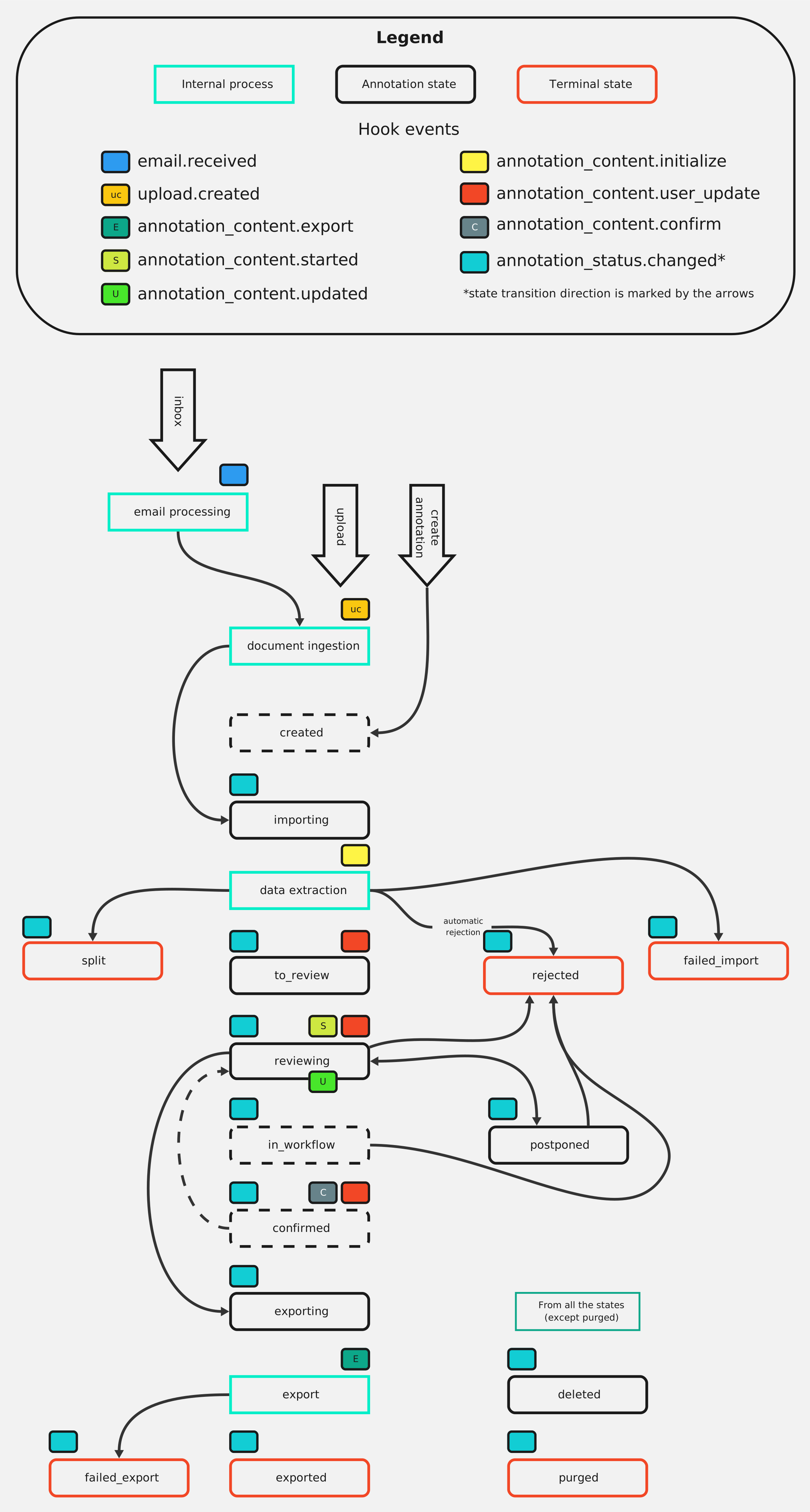
Webhook Events Occurrence Diagram
To show an overview of the Hook events and when they are happening, this diagram was created.
Hooks common attributes
| Key | Type | Description |
|---|---|---|
| request_id | UUID | Hook call request ID |
| timestamp | datetime | Timestamp when the hook was called |
| hook | URL | Hook's url |
| action | string | Hook's action |
| event | string | Hook's event |
| settings | object | Copy of hook.settings attribute |
Annotation status event data format
annotation_status event contains following additional event specific attributes.
| Key | Type | Description |
|---|---|---|
| annotation | object | Annotation object (enriched with attribute previous_status) |
| document | object | Document object (attribute annotations is excluded) |
| queues* | list[object] | list of related queue objects |
| modifiers* | list[object] | list of related modifier objects |
| schemas* | list[object] | list of related schema objects |
| emails* | list[object] | list of related email objects (for annotations created after email ingestion) |
| related_emails* | list[object] | list of related emails objects (other related emails) |
| relations* | list[object] | list of related relation objects |
| child_relations* | list[object] | list of related child_relation objects |
| suggested_edits* | list[object] | list of related suggested_edits objects |
| assignees* | list[object] | list of related assignee objects |
| pages* | list[object] | list of related pages objects |
| labels* | list[object] | list of related labels objects |
| automation_blockers* | list[object] | list of related automation_blockers objects |
* Attribute is only included in the request when specified in hook.sideload. Please note that sideloading of modifier object from different organization is not supported and that sideloading can decrease performance. See also annotation sideloading section.
Example webhook request payload with sideloaded queues:
{
  "request_id": "ae7bc8dd-73bd-489b-a3d2-f5214b209591",
  "timestamp": "2020-01-01T00:00:00.000000Z",
  "base_url": "https://example.rossum.app",
  "hook": "https://example.rossum.app/api/v1/hooks/781",
  "action": "changed",
  "event": "annotation_status",
  "queues": [
    {
      "id": 8198,
      "name": "Received invoices",
      "url": "https://example.rossum.app/api/v1/queues/8198",
      "metadata": {},
      "use_confirmed_state": false,
      "settings": {}
    }
  ]
}
Annotation content event data format
annotation_content event contains following additional event specific attributes.
| Key | Type | Description |
|---|---|---|
| annotation | object | Annotation object. Content is pre-loaded with annotation content. Annotation data are enriched with normalized_value, see example. |
| document | object | Document object (attribute annotations is excluded) |
| updated_datapoints** | list[int] | List of IDs of datapoints that were changed by last or all predecessor events. |
| queues* | list[object] | list of related queue objects |
| modifiers* | list[object] | list of related modifier objects |
| schemas* | list[object] | list of related schema objects |
| emails* | list[object] | list of related email objects (for annotations created after email ingestion) |
| related_emails* | list[object] | list of related emails objects (other related emails) |
| relations* | list[object] | list of related relation objects |
| child_relations* | list[object] | list of related child_relation objects |
| suggested_edits* | list[object] | list of related suggested_edits objects |
| assignees* | list[object] | list of related assignee objects |
| pages* | list[object] | list of related pages objects |
| labels* | list[object] | list of related labels objects |
| automation_blockers* | list[object] | list of related automation_blockers objects |
* Attribute is only included in the request when specified in hook.sideload. Please note that sideloading of modifier object from different organization is not supported and that sideloading can decrease performance. See also annotation sideloading section.
** If the run_after attribute chains the hooks, the updated_datapoints will contain a list of all datapoint ids that were updated by any of the predecessive hooks. Moreover, in case of add operation on a multivalue table, the updated_datapoints will contain the id of the multivalue, the id of the new tuple datapoints and the id of all the newly created cell datapoints.
Annotation content event response format
All of the annotation_content events expect a JSON object with the following
optional lists in the response: messages and operations
The message object contains attributes:
| Key | Type | Description |
|---|---|---|
| id | integer | Optional unique ID of the relevant datapoint; omit for a document-wide issues |
| type | enum | One of: error, warning or info. |
| content | string | A descriptive message to be shown to the user |
| detail | object | Detail object that enhances the response from a hook. (For more info refer to message detail) |
For example, you may use error for fatals like a missing required field, whereas info is suitable to decorate a supplier company ID with its name as looked up in the supplier's database.
The operations object describes operation to be performed on the annotation
data (replace, add, remove). Format of the operations key is the same as for
bulk update of annotations, please refer to the annotation
content API for complete description.
User visible messages that are returned from the hooks can contain the following list of HTML markup elements: b, strong, a, ul, ol, li, i, br. This markup enables better readability of the message to the user.
Parsable error response format
It's possible to use the same format even with non-2XX response codes. In this type of response, operations are not considered.
Example payload for parsable error response:
{
  "messages": [
    {
      "id": "all",
      "type": "error",
      "content": "custom error message to be displayed in the UI"
    }
  ]
}
initialize event of annotation_content action additionally accepts list of automation_blockers objects.
This allows for manual creation of automation blockers of type extension and therefore stops the automation without the need to create an error message.
The automation_blockers object contains attributes
| Key | Type | Description |
|---|---|---|
| id | integer | Optional unique ID of the relevant datapoint; omit for a document-wide issues |
| content | str | A descriptive message to be stored as an automation blocker |
Example response payload with automation blockers:
{
  "messages": [],
  "operations": [],
  "automation_blockers": [
    {
      "id": 1357,
      "content": "Unregistered vendor"
    },
    {
      "content": "PO not found in the master data!"
    }
  ]
}
Email received event data format
email event contains following additional event specific attributes.
| Key | Type | Description |
|---|---|---|
| files | list[object] | List of objects with metadata of each attachment contained in the arriving email. |
| headers | object | Headers extracted from the arriving email. |
| body | object | Body extracted from the arriving email. |
| URL | URL of the arriving email. | |
| queue | URL | URL of the arriving email's queue. |
The files object contains attributes:
| Key | Type | Description |
|---|---|---|
| id | string | Some arbitrary identifier. |
| filename | string | Name of the attachment. |
| mime_type | string | MIME type of the attachment. |
| n_pages | integer | Number of pages (defaults to 1 if it could not be acquired). |
| height_px | float | Height in pixels (300 DPI is assumed for PDF files, defaults to null if it could not be acquired). |
| width_px | float | Width in pixels (300 DPI is assumed for PDF files, defaults to null if it could not be acquired). |
| document | URL | URL of related document object. |
The headers object contains the same values as are available for initialization of values in email_header:<id> (namely: from, to, reply-to, subject, message-id, date).
The body object contains the body_text_plain and body_text_html.
Email received event response format
All of the email events expect a JSON object with the following lists in the response: files, additional_files, extracted_original_sender
The files object contains attributes:
| Key | Type | Description |
|---|---|---|
| id | int | ID of file that will be used for creating an annotation |
| values | list[object] | This is used to initialize datapoint values. See values object description below |
The values object consists of the following:
| Key | Type | Description |
|---|---|---|
| id | string | ID of value - must start with email: prefix (to use this value refer to it in rir_field_names field in the schema similarly as described here). |
| value | string | String value to be used when annotation content is being constructed |
This is useful for filtering out unwanted files by some measures that are not available in Rossum by default.
When all files are to be used for creating annotations (ie no filtering should occur), all have to appear in the files list.
If there are multiple hooks configured for the event, annotations are created only for files mentioned in all the responses (their values are merged together with the latest called hooks having the highest priority).
The additional_files object contains attributes:
| Key | Type | Default | Required | Description |
|---|---|---|---|---|
| document | URL | yes | URL of the document object that should be included. If document belongs to an annotation it must also belong to the same queue as email inbox. | |
| values | list[object] | [] | no | This is used to initialize datapoint values. See values object description above |
| import_document | bool | false | no | Set to true if Rossum should import document and create an annotation for it, otherwise it will be just linked as an email attachment. Only applicable if document hasn't already an annotation attached. |
The extracted_original_sender object looks as follows:
| Key | Type | Description |
|---|---|---|
| extracted_original_sender | email_address_object | Information about sender containing keys email and name. |
This is useful for updating the email address field on email object with a new sender name and email address.
If there are multiple hooks configured for the event, the extracted_original_sender results are merged together (with the latest called hooks having the highest priority).
Upload created event data format
upload event contains following additional event specific attributes.
| Key | Type | Description |
|---|---|---|
| files | list[object] | List of objects with metadata of each uploaded document. |
| documents | list[object] | List of document objects corresponding with the files object. |
| upload | object | Object representing the upload. |
| metadata | object | Client data passed in through the upload resource to create annotations with. |
| URL | URL of the arriving email or null if the document was uploaded via API. | |
| extracted_archives* | list[object] | List of ZIP archives that were unpacked as part of this upload. |
* Attribute is only included in the request when specified in hook.sideload.
The files object contains attributes:
| Key | Type | Description |
|---|---|---|
| document | URL | URL of the uploaded document object. |
| prevent_importing | bool | If set no annotation is going to be created for the document or if already existing it is not going to be switched to importing status. |
| failed_import | bool | If set to true, annotation will be created or updated with failed_import status. |
| values | list[object] | This is used to initialize datapoint values. See values object description below |
| queue | URL | URL of the queue the document is being uploaded to. |
| annotation | URL | URL of the documents annotation or null if it doesn't exist. |
The values object consists of the following:
| Key | Type | Description |
|---|---|---|
| id | string | ID of value (to use this value refer to it in rir_field_names field in the schema similarly as described here). |
| value | string | String value to be used when annotation content is being constructed |
The extracted_archives object contains attributes:
| Key | Type | Description |
|---|---|---|
| document | URL | URL of the ZIP archive document that was unpacked. |
| original_file_name | string | Original file name of the ZIP archive. |
| child_documents | list[URL] | URLs of the documents extracted from this archive, in the archive's original order. |
Upload created event response format
All of the upload events expect a JSON object with the files object list in the response.
The files object contains attributes:
| Key | Type | Description | Required |
|---|---|---|---|
| document | URL | URL of the uploaded document object. | true |
| prevent_importing | bool | If set to true, no annotation is going to be created for the document or if already exists it is not going to be switched to importing status. If failed_import=true is set, this field is ignored. Default false. | false |
| failed_import | bool | If set to true, annotation will be created or updated with failed_import status. Allows partial upload failures without failing the entire upload task. Default false. | false |
| messages | list[object] | List of messages that will be appended to the related annotation. | false |
Validating payloads from Rossum
Example of a webhook payload validator written in Python:
import hashlib
import hmac

from flask import Flask, request, abort

app = Flask(__name__)

SECRET_KEY = "<Your secret key stored in hook.config.secret>"

@app.route("/test_hook", methods=["POST"])
def test_hook():
    digest = hmac.new(SECRET_KEY.encode(), request.data, hashlib.sha256).hexdigest()
    try:
        prefix, signature = request.headers["X-Rossum-Signature-SHA256"].split("=")
    except ValueError:
        abort(401, "Incorrect header format")

    if not (prefix == "sha256" and hmac.compare_digest(signature, digest)):
        abort(401, "Authorization failed.")
    return
For authorization of payloads, the shared secret method is used.
When a secret token is set in hook.config.secret, Rossum uses it to create a hash signature with each payload.
This hash signature is passed along with each request in the headers as X-Rossum-Signature-SHA256.
The goal is to compute a hash using hook.config.secret and the request body,
and ensure that the signature produced by Rossum is the same. Rossum uses HMAC SHA256 signature by default.
Previously, Rossum was using SHA1 algorithm to sign the payload. This option is
still available as a legacy X-Elis-Signature header. Please contact
Rossum support to enable this header in case it is missing.
The algorithm used is the same as the one of Github.
Webhook requests may also be authenticated using a client SSL certificate, see Hook API for reference.
Access to Rossum API
You can access Rossum API from the Webhook. Each execution gets unique API key. The key is valid
for 10 minutes or until Rossum receives a response from the Webhook. You can set token_lifetime_s up to 2 hours to keep
the token valid longer. The API key and the environment's base URL are passed to webhooks as a first-level attributes
rossum_authorization_token and base_url within the webhook payload.
The rossum_authorization_token field is only included in the payload when the hook has a token_owner configured.
Access to third-party APIs
When the hook has integration credentials attached, the payload contains
a first-level credentials attribute with a short-lived access token resolved for each credential —
the stored client secret itself never leaves the platform:
{
  "credentials": [
    {
      "id": 42,
      "name": "Acme Corp — Coupa prod",
      "type": "coupa_sand_oauth2",
      "access_token": "eyJ...",
      "expires_at": "2026-07-14T10:12:00.000000Z"
    }
  ]
}
The attribute is present only when at least one credential is attached. When the token cannot be obtained (the third party is unreachable or rejects the credential), the hook execution fails with a readable error message before the extension is called, so an extension never runs without the credentials it relies on.
A credential can be verified before it is saved or attached to a hook using the test endpoints — Rossum obtains a token and checks that all requested scopes were granted.
Serverless Function Extension
Serverless functions allow to extend Rossum functionality without setup and maintenance of additional services.
Webhooks and Serverless functions share a basic setup: input and output data format and error handling. They are both configured using a hook API object.
Unlike webhooks, serverless functions do not send the event and action notifications to a specific URL. Instead, the function's code snippet is executed within the Rossum platform. See function API description for details about how to set up a serverless function and connect it to the queue.
For description of supported events, actions and input/output data examples, please refer to Webhook Extensions section.
Supported runtimes
Currently, Rossum supports NodeJS and Python to execute serverless functions. See the table below for a full list of supported runtimes. If you would like to use another runtime, please let us know at product@rossum.ai.
Please be aware that we may eventually deprecate and remove runtimes in the future.
| Name | Identifier | Deprecation date | Block function creation date | Removal date | Note |
|---|---|---|---|---|---|
| Python 3.12 | python3.12 | not scheduled | not scheduled | not scheduled | |
| NodeJS 22 | nodejs22.x | 2026-09-01 | 2026-12-01 | 2027-06-01 | |
| NodeJS 24 | nodejs24.x | not scheduled | not scheduled | not scheduled |
Runtime deprecations
We schedule runtime deprecation when it is being phased out by the serverless vendors. The recommended action is to upgrade to one of the up-to-date runtimes.
See the table above for specific deprecation dates of individual runtimes.
- Deprecation date - Date when the deprecation is announced.
- Block function creation date - From this date, it will not be possible to create new extensions with the deprecated runtime. Existing extensions can be used as they are and their code can be updated until the removal date.
- Removal date - All extensions will be automatically switched to the up-to-date runtime on this date. We recommend making the switch earlier to test and update the code if needed, to avoid any issues.
Python Runtime and Rossum Transaction Scripts
The python3.12 runtime includes a txscript module that provides convenience
functionality for working with Rossum objects,
in particular in the context of the annotation_content event.
Implementation
'''
This custom serverless function example demonstrates showing messages to the
user on the validation screen, updating values of specific fields, and
executing actions on the annotation.

See https://rossum.app/api/docs/openapi/guides/rossum-transaction-scripts/ for more examples.
'''

from txscript import TxScript, default_to, substitute

def rossum_hook_request_handler(payload: dict) -> dict:
    t = TxScript.from_payload(payload)

    for row in t.field.line_items:
        if default_to(row.item_amount_base, 0) >= 1000000:
            t.show_warning('Value is too big', row.item_amount_base)

    t.field.document_id = substitute(r'-', '', t.field.document_id)

    if default_to(t.field.amount_total, 0) > 1000000:
        print("postponing")
        t.annotation.action("postpone")
        return t.hook_response()

    return t.hook_response()
// This serverless function example can be used for annotation_content events
// (e.g. updated action). annotation_content events provide annotation
// content tree as the input.
//
// The function below shows how to:
// 1. Display a warning message to the user if "item_amount_base" field of
// a line item exceeds a predefined threshold
// 2. Removes all dashes from the "invoice_id" field
//
// item_amount_base and invoice_id should be fields defined in a schema.
exports.rossum_hook_request_handler = async (payload) => {
const content = payload.annotation.content;
try {
const TOO_BIG_THRESHOLD = 1000000;
const amountBaseColumnDatapoints = findBySchemaId(
content,
'item_amount_base',
);
const messages = [];
for (var i = 0; i < amountBaseColumnDatapoints.length; i++) {
if (amountBaseColumnDatapoints[i].content.normalized_value >= TOO_BIG_THRESHOLD) {
messages.push(
createMessage(
'warning',
'Value is too big',
amountBaseColumnDatapoints[i].id,
),
);
}
}
const [invoiceIdDatapoint] = findBySchemaId(content, 'invoice_id');
const operations = [
createReplaceOperation(
invoiceIdDatapoint,
invoiceIdDatapoint.content.value.replace(/-/g, ''),
),
];
return {
messages,
operations,
};
} catch (e) {
const messages = [
createMessage('error', 'Serverless Function: ' + e.message)
];
return {
messages,
};
}
};
const findBySchemaId = (content, schemaId) =>
content.reduce(
(results, dp) =>
dp.schema_id === schemaId ? [...results, dp] :
dp.children ? [...results, ...findBySchemaId(dp.children, schemaId)] :
results,
[],
);
const createMessage = (type, content, datapointId = null) => ({
content: content,
type: type,
id: datapointId,
});
const createReplaceOperation = (datapoint, newValue) => ({
op: 'replace',
id: datapoint.id,
value: {
content: {
value: newValue,
},
},
});To implement a serverless function, create a hook object of type
function. Use code object config attribute to specify a serialized source
code. You can use a code editor built-in to the Rossum UI, which also allows to
test and debug the function before updating the code of the function itself.
See Python and NodeJS examples of a serverless function implementation next to this section or check out this article (and others in the relevant section).
Please note that users are responsible for their code that is being executed. Be sure not to expose any sensitive data or trigger excessive usage of the function API. In case of violation of the Rossum terms of use, the organization account may be suspended.
If there is an issue with an extension code itself, it will be displayed as CallFunctionException in the
annotation view. Raising this exception usually means issues such as:
- undefined variables are called in the code
- the code is raising an exception as a response rather than returning a proper response
Testing
To write, test and debug a serverless function, you can refer to this guide.
Limitations
By default, no internet access is allowed from a serverless function, except the Rossum API. If your functions require internet access to work properly, e.g. when exporting data over API to ERP system, please let us know at product@rossum.ai.
Access Rossum API
The Rossum API can be accessed directly from serverless functions. See examples below for how to access the Rossum API from a serverless function.
import json
import urllib.request

def rossum_hook_request_handler(payload):
    request = urllib.request.Request(
      "https://example.rossum.app/api/v1/queues",
      headers={"Authorization": "Bearer " + payload["rossum_authorization_token"]}
    )
    with urllib.request.urlopen(request) as response:
        queues = json.loads(response.read())
    queue_names = (q["name"] for q in queues["results"])
    return {"messages": [{"type": "info", "content": ", ".join(queue_names)}]}
const https = require('https');
exports.rossum_hook_request_handler = async (payload) => {
const token = payload.rossum_authorization_token;
queues = JSON.parse(await getFromRossumApi("https://example.rossum.app/api/v1/queues", token));
queue_names = queues.results.map(q => q.name).join(", ")
return { "messages": [{"type": "info", "content": queue_names}] };
}
const getFromRossumApi = async (url, token) => {
const parsedUrl = new URL(url);
const options = {
hostname: parsedUrl.hostname,
path: parsedUrl.pathname + parsedUrl.search,
method: 'GET',
headers: {
'Authorization': 'Bearer ' + token,
},
};
const response = await new Promise((resolve, reject) => {
let dataString = '';
const req = https.request(options, function(res) {
res.on('data', chunk => {
dataString += chunk;
});
res.on('end', () => {
resolve({
statusCode: 200,
body: dataString
});
});
});
req.on('error', (e) => {
reject({
statusCode: 500,
body: 'Something went wrong!'
});
});
req.end()
});
return response.body
}Connector Extension
Webhooks are more recent and flexible alternative to connectors. For new implementations, consider using webhooks.
The connector component is aimed at two main use-cases: applying custom business rules during data validation, and direct integration of Rossum with downstream systems.
The connector component receives two types of callbacks - an on-the-fly validation callback on every update of captured data, and an on-export save callback when the document capture is finalized.
The custom business rules take use chiefly of the on-the-fly validation callback. The connector can auto-validate and transform both the initial AI-based extractions and each user operator edit within the validation screen; based on the input, it can push user-visible messages and value updates back to Rossum. This allows for both simple tweaks (like verifying that two amounts sum together or transforming decimal points to thousand separators) and complex functionality like intelligent PO match.
The integration with downstream systems on the other hand relies mainly on the save callback. At the same moment a document is exported from Rossum, it can be imported to a downstream system. Since there are typically constraints on the captured data, these constraints can be enforced even within the validation callback.
Implement a connector
The Extension Howto on our Developer Hub is a good starting point when building your own connector.
Connectors are designed to be implemented using a push-model using common HTTPS protocol. When annotation content is changed, or when data export is triggered, specific connector endpoint is called with annotation data as a request payload. The connector must be deployed with a public IP address so that the Rossum platform can call its endpoints; for testing, a middleware like ngrok or serveo may come useful.
Example of a valid no-op (empty) validate response:
{"messages": [], "updated_datapoints": []}Example of a valid no-op (empty) save response:
{}Example data sent to connector (validate, save):
{
  "meta": {
    "document_url": "https://example.rossum.app/api/v1/documents/6780",
    "arrived_at": "2019-01-30T07:55:13.208304Z",
    "original_file": "https://example.rossum.app/api/v1/original/bf0db41937df8525aa7f3f9b18a562f3",
    "original_filename": "Invoice.pdf",
    "queue_name": "Invoices",
    "workspace_name": "EU",
    "organization_name": "East West Trading Co",
    "annotation": "https://example.rossum.app/api/v1/annotations/4710",
    "queue": "https://example.rossum.app/api/v1/queues/63",
    "workspace": "https://example.rossum.app/api/v1/workspaces/62",
    "organization": "https://example.rossum.app/api/v1/organizations/1",
    "modifier": "https://example.rossum.app/api/v1/users/27",
    "updated_datapoint_ids": ["197468"],
    "modifier_metadata": {},
    "queue_metadata": {},
    "annotation_metadata": {},
    "rir_poll_id": "54f6b9ecfa751789f71ddf12",
    "automated": false
  },
  "content": [
    {
      "id": "197466",
      "category": "section",
      "schema_id": "invoice_info_section",
      "children": [
        {
          "id": "197467",
          "category": "datapoint",
          "schema_id": "invoice_number",
          "page": 1,
          "position": [916, 168, 1190, 222],
          "rir_position": [916, 168, 1190, 222],
          "rir_confidence": 0.97657,
          "value": "FV103828806S",
          "validation_sources": ["score"],
          "type": "string"
        },
        {
          "id": "197468",
          "category": "datapoint",
          "schema_id": "date_due",
          "page": 1,
          "position": [938, 618, 1000, 654],
          "rir_position": [940, 618, 1020, 655],
          "rir_confidence": 0.98279,
          "value": "12/22/2018",
          "validation_sources": ["score"],
          "type": "date"
        },
        {
          "id": "197469",
          "category": "datapoint",
          "schema_id": "amount_due",
          "page": 1,
          "position": [1134, 1050, 1190, 1080],
          "rir_position": [1134, 1050, 1190, 1080],
          "rir_confidence": 0.74237,
          "value": "55.20",
          "validation_sources": ["human"],
          "type": "number"
        }
      ]
    },
    {
      "id": "197500",
      "category": "section",
      "schema_id": "line_items_section",
      "children": [
        {
          "id": "197501",
          "category": "multivalue",
          "schema_id": "line_items",
          "children": [
            {
              "id": "198139",
              "category": "tuple",
              "schema_id": "line_item",
              "children": [
                {
                  "id": "198140",
                  "category": "datapoint",
                  "schema_id": "item_desc",
                  "page": 1,
                  "position": [173, 883, 395, 904],
                  "rir_position": null,
                  "rir_confidence": null,
                  "value": "Red Rose",
                  "validation_sources": [],
                  "type": "string"
                },
                {
                  "id": "198142",
                  "category": "datapoint",
                  "schema_id": "item_net_unit_price",
                  "page": 1,
                  "position": [714, 846, 768, 870],
                  "rir_position": null,
                  "rir_confidence": null,
                  "value": "1532.02",
                  "validation_sources": ["human"],
                  "type": "number"
                }
              ]
            }
          ]
        }
      ]
    }
  ]
}
The connector API consists of two endpoints, validate and save, described below. A connector must always implement both endpoints (though they may not necessarily perform a function in a particular connector - see the right column for an empty reply example), the platform raises an error if it is not able to run an endpoint.
In case a custom connector extension is deployed by a user in production, it should follow our best practices:
- run on HTTPS and have a valid public certificate
- be fast enough to keep up the pace with Rossum interactive behavior
- be able to receive traffic from any IP address. (Source IP address may change over time.)
- require authentication by authentication token to prevent data leaks or forgery
Setup a connector
The next step after implementing the first version of a connector is configuring it in the Rossum platform.
In Rossum, a connector object defines service_url and params for
construction of HTTPS requests and authorization_token that is passed in
every request to authenticate the caller as the actual Rossum server. It may also
uniquely identify the organization when multiple Rossum organizations share the
same connector server.
To set up a connector for a queue, create a connector object using our API – follow these instructions. A connector object may be associated with one or more queues. One queue can only have one connector object associated with it.
Connector API
All connector endpoints, representing particular points in the
document lifetime, are simple verbs that receive a JSON POSTed and
potentially expect a JSON returned in turn.
The authorization type and authorization token is passed as an Authorization
HTTP header. Authorization type may be secret_key (shared secret) or Basic
for HTTP basic authentication.
Please note that for Basic authentication, authorization_token is passed
as-is, therefore it must be set to a correct base64 encoded value. For example
username connector and password secure123 is encoded as
Y29ubmVjdG9yOnNlY3VyZTEyMw== authorization token.
Connector requests may be authenticated using a client SSL certificate, see Connector API for reference.
Errors
If a connector does not implement an endpoint, it may return HTTP status 404. An endpoint may fail, returning either HTTP 4xx or HTTP 5xx; for some endpoints (like validate and save), this may trigger a user interface message; either the error key of a JSON response is used, or the response body itself in case it is not JSON. The connector endpoint save can be called in asynchronous (default) as well as synchronous mode (useful for embedded mode).
Data format
The received JSON object contains two keys, meta carrying the metadata and content
carrying endpoint-specific content.
The metadata identify the concerned document, containing attributes:
| Key | Type | Description |
|---|---|---|
| document_url | URL | document URL |
| arrived_at | timestamp | A time of document arrival in Rossum (ISO 8601) |
| original_file | URL | Permanent URL for the document original file |
| original_filename | string | Filename of the document on arrival in Rossum |
| queue_name | string | Name of the document's queue |
| workspace_name | string | Name of the document's workspace |
| organization_name | string | Name of the document's organization |
| annotation | URL | Annotation URL |
| queue | URL | Document's queue URL |
| workspace | URL | Document's workspace URL |
| organization | URL | Document's organization URL |
| modifier | URL | Modifier URL |
| modifier_metadata | object | Metadata attribute of the modifier, see metadata |
| queue_metadata | object | Metadata attribute of the queue, see metadata |
| annotation_metadata | object | Metadata attribute of the annotation, see metadata |
| rir_poll_id | string | Internal extractor processing ID |
| updated_datapoint_ids | list[string] | IDs of objects that were recently modified by user |
| automated | bool | Flag whether annotation was automated |
A common class of content is the annotation tree, which is a JSON object that can contain nested datapoint objects, and matches the schema datapoint tree.
Intermediate nodes have the following structure:
| Key | Type | Description |
|---|---|---|
| id | integer | A unique ID of the given node |
| schema_id | string | Reference mapping the node to the schema tree |
| category | string | One of section, multivalue, tuple |
| children | list | A list of other nodes |
Datapoint (leaf) nodes structure contains actual data:
| Key | Type | Description |
|---|---|---|
| id | integer | A unique ID of the given node |
| schema_id | string | Reference mapping the node to the schema tree |
| category | string | datapoint |
| type | string | One of string, date or number, as specified in the schema |
| value | string | The datapoint value, string represented but normalizes, to that they are machine readable: ISO format for dates, a decimal for numbers |
| page | integer | A 1-based integer index of the page, optional |
| position | list[float] | List of four floats describing the x1, y1, x2, y2 bounding box coordinates |
| rir_position | list[float] | Bounding box of the value as detected by the data extractor. Format is the same as for position. |
| rir_confidence | float | Confidence (estimated probability) that this field was extracted correctly. |
Note that for both meta and content the set of keys returned is subject to extension.
Annotation lifecycle with a connector
If an asynchronous connector is deployed to a queue, an annotation status will change from reviewing to exporting and subsequently to exported or failed_export. If no connector extension is deployed to a queue or if the attribute asynchronous is set to false, an annotation status will change from reviewing to exported (or failed_export) directly.
Endpoint: validate
This endpoint is called after the document processing has finished, when operator opens a document
in the Rossum verification interface and then every time after operator updates a field. After the
processing is finished, the initial validate call is marked with initial=true URL parameter.
For the other calls, only /validate without the parameter is called. Note that after document processing, initial
validation is followed by business rules execution for both validation and annotation_imported events.
The request path is fixed to /validate and cannot be changed.
It may:
- validate the given annotation tree and return a list of messages commenting on it (e.g. pointing out errors or showing matched suppliers).
- update the annotation tree by returning a list of replace, add and remove operations
Both the messages and the updated data are shown in the verification interface. Moreover, the messages may block confirmation in the case of errors.
This endpoint should be fast as it is part of an interactive workflow.
Receives an annotation tree as content.
Returns a JSON object with the lists: messages, operations and updated_datapoints.
Keys messages, operations (optional)
The description of these keys was moved to the Hook Extension.
Key updated_datapoints (optional, deprecated)
We also support a simplified version of updates using updated_datapoints
response key. It only supports updates (no add or remove operations) and is now
deprecated. The updated datapoint object contains attributes:
| Key | Type | Description |
|---|---|---|
| id | string | A unique ID of the relevant datapoint, currently only datapoints of category datapoint can be updated |
| value | string | New value of the datapoint. Value is formatted according to the datapoint type (e.g. date is string representation of ISO 8601 format). |
| hidden | boolean | Toggle for hiding/showing of the datapoint, see datapoint |
| options | list[object] | Options of the datapoint -- valid only for type=enum, see enum options |
| position | list[float] | New position of the datapoint, list of four numbers. |
Validate endpoint should always return 200 OK status.
An error message returned from the connector prevents user from confirming the document.
Endpoint: save
This endpoint is called when the invoice transitions to the exported state.
Connector may process the final document annotation and save it to the target
system. It receives an annotation tree as content. The request path is fixed
to /save and cannot be changed.
The save endpoint is called asynchronously (unless synchronous mode is set) in related connector object. Timeout of the save endpoint is 60 seconds.
The save endpoint configuration influences the document state flow - when the document
leaves the reviewing state, it enters the exporting state in case the save
endpoint is called asynchronously. Otherwise, it transitions straight to the exported
state.
For successful export, the request should have 2xx status.
Example of successful save responses without messages in UI:
HTTP/1.1 204 No ContentHTTP/1.1 200 OK
Content-Type: text/plain
this response body is ignoredHTTP/1.1 200 OK
Content-Type: application/json
{
"messages": []
}When messages are expected to be displayed in the UI, they should be sent in the same format as in validate endpoint.
Example of successful save response with messages in UI:
HTTP/1.1 200 OK
Content-Type: application/json

{
  "messages": [
    {
      "content": "Everything is OK.",
      "id": null,
      "type": "info"
    }
  ]
}
If the endpoint fails with an HTTP error and/or message of type error is received,
the document transitions to the failed_export state - it is then available
to the operators for manual review and re-queueing to the to_review state
in the user interface. Re-queueing may be done also programmatically via
the API using a PATCH call to set to_review annotation status. Patching
annotation status to exporting state triggers an export retry.
Example of failed save response with messages in UI:
HTTP/1.1 422 Unprocessable Entity
Content-Type: application/json

{
  "messages": [
    {
      "content": "Even though this message is info, the export will fail due to the status code.",
      "id": null,
      "type": "info"
    }
  ]
}
Example of failed save response with messages in UI:
HTTP/1.1 500 Internal Server Error
Content-Type: text/plain

An error message "Export failed." will show up in the UI
Example of failed save response with messages in UI:
HTTP/1.1 200 OK
Content-Type: application/json

{
  "messages": [
    {
      "content": "Proper status code could not be set.",
      "id": null,
      "type": "error"
    }
  ]
}
In the future, 5xx error status may cause automatic retries on the Rossum side. Currently, no automatic retries are performed.
Custom UI Extension
Sometimes users might want to extend the behavior of UI validation view with something special. That should be the goal of custom UI extensions.
Buttons
Currently, there are two different ways of using a custom button:
- Popup Button - opens a specific URL in the web browser
- Validate Button - triggers a standard validate call to connector
If you would like to read more about how to create a button, see the Button schema.
Popup Button
Popup Button opens a website completely managed by the user in a separate tab. It runs in parallel to the validation interface session in the app. Such website can be used for any interface that will assist operators in the reviewing process.
Example Use Cases of Popup Button:
- opening an email linked to the annotated document
- creating a new item in external database according to extracted data
Communication with the Validation Interface
Calling Rossum API from a popup outside the scope of the calls described below is not possible.
You can communicate with the validation interface directly using standard browser API of window.postMessage. You will need to use window.addEventListeners in order to receive messages from the validation interface:
window.addEventListener('message', ({ data: { type, result } }) => {
  // logic
});
The shape of the result key is the same as the top level content
attribute of the annotation content response.
Once the listener is in place, you can post one of supported message types:
GET_DATAPOINTS- returns the same tree structure you'd get by requesting annotation content
window.opener.postMessage(
  { type: 'GET_DATAPOINTS' },
  'https://example.rossum.app'
)UPDATE_DATAPOINT- sends updated value to a Rossum datapoint. Only one datapoint value can be updated at a time.
window.opener.postMessage(
  {
    type: 'UPDATE_DATAPOINT',
    data: {id: DATAPOINT_ID, value: "Updated value"}
  },
  'https://example.rossum.app'
)FINISH- informs the Rossum app that the popup process is ready to be closed. After this message is posted, popup will be closed and Rossum app will trigger a validate call.
window.opener.postMessage(
  { type: 'FINISH' },
  'https://example.rossum.app'
);
Providing message type to postMessage lets Rossum interface know what operation user requests and determines the type of the answer which could be used to match appropriate response.
Validate button
If popup_url key is missing in button's schema, clicking the button will trigger a standard validate call to connector. In such call, updated_datapoint_ids will contain the ID of the pressed button.
Note: if you're missing some annotation data that you'd like to receive in a similar way, do contact our support team. We're collecting feedback to further expand this list.
Extension Logs
For easy and efficient development process of the extensions, our backend logs requests, responses (if enabled) and
additional information, when the hook is being called.
Hook Log
The hook log objects consist of following attributes, where it also differentiates between the hook events as follows:
Base Hook Log object
These attributes are included in all the logs independent of the hook event
| Key | Type | Description | Optional |
|---|---|---|---|
| timestamp* | str | Timestamp of the log-record | |
| request_id | UUID | Hook call request ID | |
| event | string | Hook's event | |
| action | string | Hook's action | |
| organization_id | int | ID of the associated Organization. | |
| queue_id | int | ID of the associated Queue. | true |
| hook_id | int | ID of the associated Hook. | |
| hook_type | str | Hook type. Possible values: webhook, function | |
| log_level | str | Log-level. Possible values: INFO, ERROR, WARNING | |
| message | str | A log-message | |
| request | str | Raw request sent to the Hook | true |
| response | str | Raw response received from the Hook | true |
*Timestamp is of the ISO 8601 format with UTC timezone e.g. 2023-04-21T07:58:49.312655
Annotation Content or Annotation Status Hook Events
In addition to the Base Hook Log object, the annotation content and annotation status event hook logs contains
the following attributes:
| Key | Type | Description | Optional |
|---|---|---|---|
| annotation_id | int | ID of the associated Annotation. | true |
Email Hook Events
In addition to the Base Hook Log object, the email event hook logs contains the following attributes:
Source IP Address ranges
Rossum will use these source IP addresses for outgoing connections to your services (e.g. when sending requests to a webhook URL):
Europe (Ireland):
- 34.254.110.123
- 52.209.175.153
- 54.217.193.239
- 54.246.127.143
Europe 2 (Frankfurt):
- 3.75.26.254
- 3.126.211.68
- 3.126.98.96
- 3.76.159.143
US (N. Virginia):
- 3.222.161.192
- 50.19.104.88
- 52.2.120.212
- 18.213.174.191
JP (Tokyo):
- 3.115.38.171
- 35.74.141.62
- 35.75.49.12
- 52.194.128.167
You can use the list to limit incoming connections on a firewall. The list may be updated eventually, please update your configuration at least once per three months.