Using Triggers
Trigger REST operations can be found here
When an event occurs, all triggers of that type will perform actions of their related objects:
| Related object | Action | Description |
|---|---|---|
| Email template | Send email with the template to the event triggerer if automate=true | Automatically respond to document vendors based on the document's content. The document has to come from an email |
| Delete recommendations | Stop automation if one of the validation rules applies to the processed document | Based on the user's rules for delete recommendations, stop automation for the document which applies to these rules. The document requires manual evaluation |
If you have a Hook and a Trigger configured for same event, the Hook action will be executed first
Trigger Event Types
Trigger objects can have one of the following event types:
| Trigger Event type | Description (Trigger for an event of) |
|---|---|
| email_with_no_processable_attachments | An Email has been received without any processable attachments |
| annotation_created | Processing of the Annotation started (Rossum received the Annotation) |
| annotation_imported | Annotation data have been extracted by Rossum |
| annotation_confirmed | Annotation was checked and confirmed by user (or automated) |
| annotation_exported | Annotation was exported. Only triggered for non-automated annotations that have an associated email |
| validation | Document is being validated |
Rule actions additionally support the annotation_import_succeeded, annotation_import_failed,
annotation_export_succeeded and annotation_export_failed events. These events are available for rules only
and cannot be used on Trigger objects. See rule events.
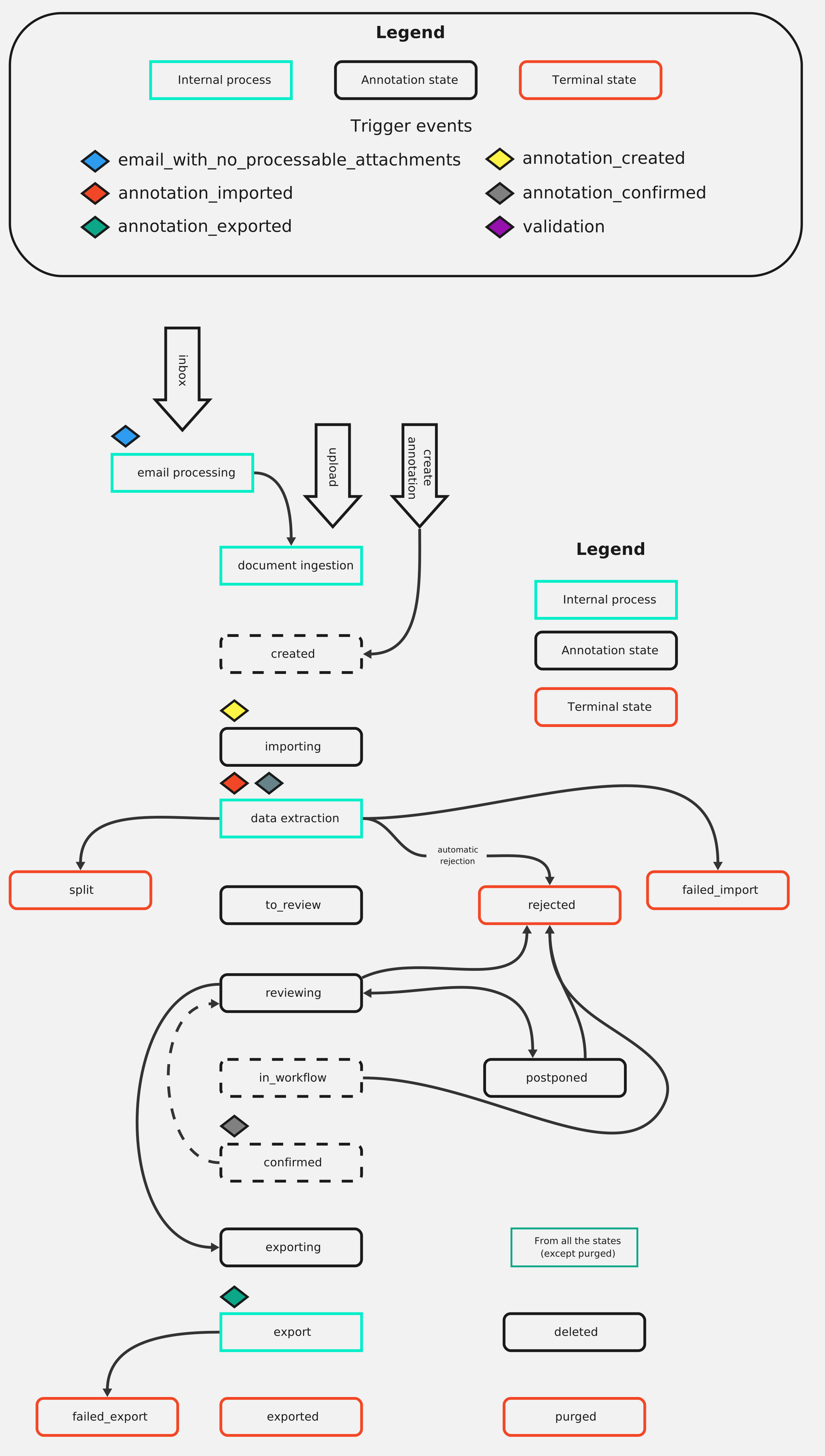
Trigger Events Occurrence Diagram
To show an overview of the Trigger events and when they are happening, this diagram was created.
Trigger Condition
A subset of MongoDB Query Language. The annotation will get converted into JSON records behind the scenes.
The trigger gets activated if at least one such record matches the condition according to the MQL query rules.
A null condition matches any record, just like {}. Record format:
{
"field": {
"{schema_id}": string | null,
},
"required_field_missing": boolean,
"missing_fields": string[],
}
Example trigger condition with AND operator:
{
  "$and": [
    {
      "field.vendor_id": {
        "$and": [
          {"$exists": true},
          {"$regex": "Meat ltd\\."}
        ]
      }
    }
  ]
}
Example on how to check if any of the required fields are missing:
{
  "$and": [
    {"required_field_missing": true}
  ]
}
This example shows how to use the AND operator to check for multiple conditions. In this case, the trigger will be activated if the vendor ID exists and matches the regex pattern "Milk( inc\.)?" and if the required field is missing.
{
  "$and": [
    {
      "field.vendor_id": {
        "$and": [
          {"$exists": true},
          {"$regex": "Milk( inc\\.)?"}
        ]
      }
    },
    {"required_field_missing": true}
  ]
}
Example checking for specific document type:
{
  "$or": [
    {
      "field.document_type": {"$eq": "invoice"}
    }
  ]
}
Example checking field value range:
{
  "$or": [
    {
      "field.vendor_id": {
        "$or": [
          {"$regex": "Milk( inc\\.)?"},
          {"$regex": "Barn( inc\\.)?"}
        ]
      }
    }
  ]
}
Example checking for high amount:
{
  "$or": [
    {
      "number_of_pages": {
        "$gt": 10
      }
    }
  ]
}
Supported MQL subset based on the trigger event type:
All trigger event types:
{}
Only annotation_imported, annotation_confirmed, and annotation_exported trigger event types:
{
"$and": [
{"field.{schema_id}": {"$and": [{"$exists": true}, REGEX]}}
]
}
Only annotation_imported trigger event type:
{
"$and": [
{"field.{schema_id}": {"$and": [{"$exists": true}, REGEX]}},
{"required_field_missing": true},
{"missing_fields": {"$elemMatch": {"$in": list[str[schema_id]]}}
]
}
Only validation trigger event type:
{
"$or": [
{"field.document_type": {"$in": list[str[document_type]]},
{"field.language": {"$in": list[str[language]]},
{"field.currency": {"$in": list[str[currency]]},
{"number_of_pages": {"$gt": 10},
{"filename": REGEX}
]
}
{
"$or": [
{"field.document_type": {"$in": list[str[document_type]]},
{"field.language": {"$in": list[str[language]]},
{"field.currency": {"$in": list[str[currency]]},
{"number_of_pages": {"$gt": 10},
{"filename": {"$or": [REGEX, REGEX]}
]
}
| Field | Required | Description |
|---|---|---|
| field.{schema_id} | A field contained in the Annotation data. The schema_id is the schema ID it got extracted under | |
| required_field_missing | Any of the schema-required fields is missing. (*) Can not be combined with missing_fields | |
| missing_fields | At least one of the schema fields is missing. (*) Can not be combined with required_field_missing | |
| field.{validation_field} | A field contained a list of Delete Recommendation data. The validation_field is the schema ID it got extracted under | |
| number_of_pages | A threshold value for the number of pages. A document with more pages is matched by the trigger. | |
| filename | The filename or subset of filenames of the document is to match. | |
| REGEX | true | Either {"$regex": re2} or {"$not": {"$regex": re2}}**. Uses re2 regex syntax |
(*) A field is considered missing if any of the two following conditions is met
-
the field has ui_configuration of type
capturedornulland no value was extracted for it andrir_confidencescore is at least 0.95 -
the field has ui_configuration of other types (
data,manual,formula, ...) and has an empty value
(**) The $not option for REGEX is not valid for the validation trigger.
Triggering Email Templates
Email template REST operations can be found here.
To set up email template trigger automation, link an email template object to a trigger object and set its automate
attribute to true. Currently, only one trigger can be linked. To set up the recipient(s) of the automated emails,
you can use built-in placeholders or direct values in the to, cc, and bcc
fields in email templates.
Only some email template types and some trigger event types can be linked together:
| Template type | Allowed trigger events |
|---|---|
| custom | * |
| email_with_no_processable_attachments | email_with_no_processable_attachments |
| rejection | annotation_imported |
| rejection_default | annotation_imported |
Email templates of type rejection and rejection_default will also reject the associated annotation when triggered.
Every newly created queue has default email templates. Some of them have a trigger linked,
including an email template of type email_with_no_processable_attachments which can not have its trigger unlinked
or linked to another trigger. To disable its automation, set its automate attribute to false.
Triggering Validation
Delete Recommendation REST operations can be found here.
To set up validation trigger automation, specify the rules for validation and set its enabled attribute to true.
This trigger is only valid for the validation trigger event.
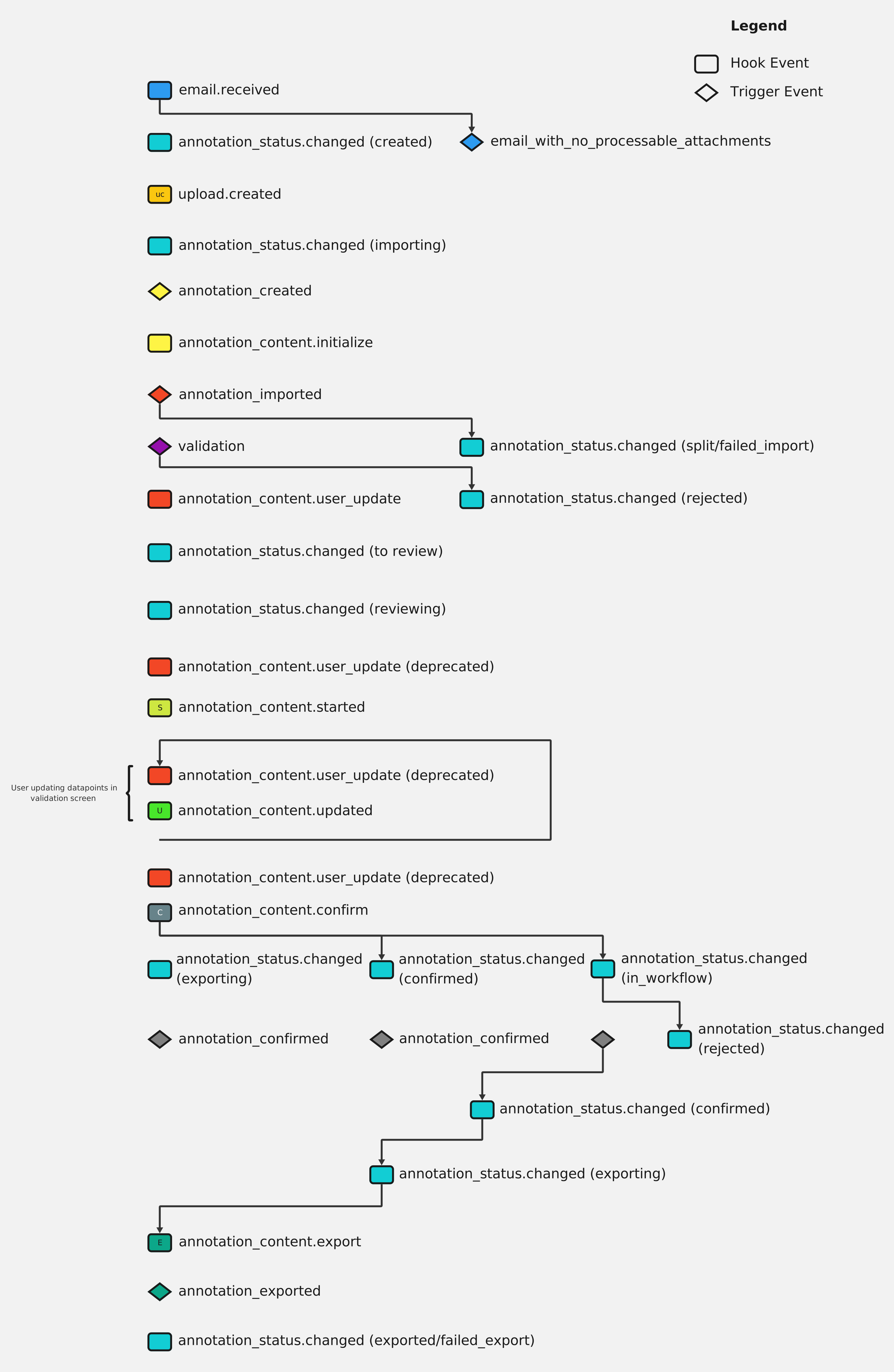
Hooks and Triggers Workflow
Sometimes it may happen that there is a need to know, what triggers and hooks and when are they run. That can be found in this workflow.